The Universal Arabic Display Problem in Software
If you've ever tried writing Arabic text in video editing software, a video game, or streaming tools, you've probably encountered a frustrating problem: Arabic text displays backwards, letters don't connect properly, and the text reads from left to right instead of right to left.
This problem isn't limited to just one application. It affects hundreds of programs that weren't designed to handle RTL (Right-to-Left) languages like Arabic, Hebrew, Persian, or Urdu. Our Arabic text reverser is the universal solution that works with virtually any software.
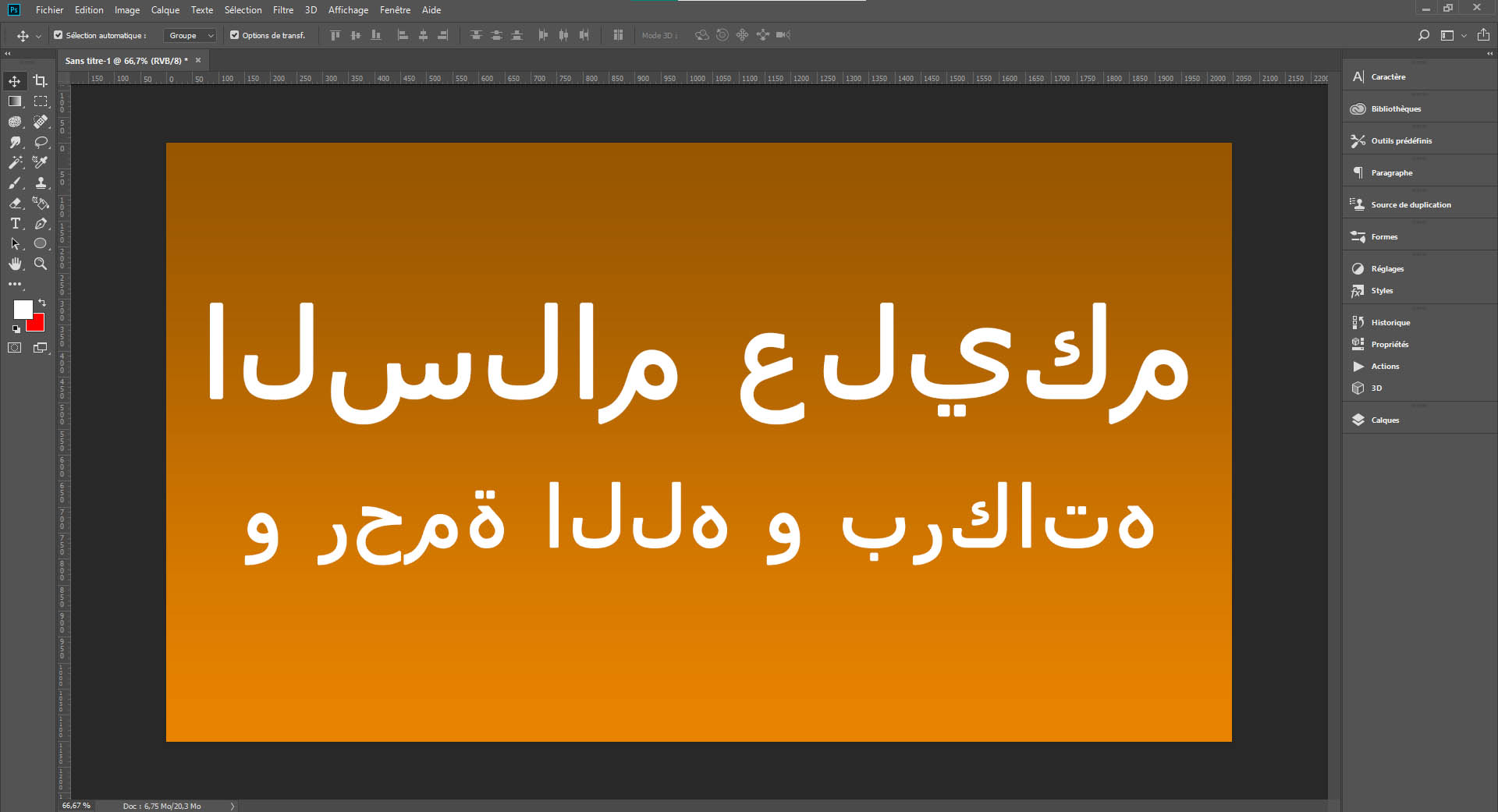
❌ The problem: reversed and disconnected Arabic text
Why Does This Problem Exist?
Most software is developed with basic support for languages written left-to-right (LTR) like English, Spanish, French, etc. For reasons of simplicity and development cost, many software creators don't program full support for RTL languages.
Adding RTL support requires a specialized rendering engine that handles:
- Right-to-left reading direction
- Automatic connection of Arabic letters (each letter has 4 forms depending on its position)
- Correct positioning of diacritical marks (تشكيل)
- Bidirectional text order (BiDi) when mixing Arabic with numbers or English
Without this engine, the software treats each Arabic character individually, producing incorrect display. This is where our Arabic text reverser becomes essential for content creators, gamers, and professionals worldwide.
🎬 Video Editing Software
Video editing is one of the most common areas where the need to write in Arabic arises. Whether you're creating tutorials, social media content, or professional videos, here's how to use our tool with popular video editing applications:
Camtasia
Camtasia, one of the most widely used video editing software for tutorials and presentations, doesn't natively support Arabic text. To add Arabic text in Camtasia:
- Type your Arabic text in our tool above
- Reverse the text with the "Reverse" button
- Copy the result
- In Camtasia, create a text annotation or title
- Paste the reversed text
- Choose an Arabic font (Arial, Tahoma, Traditional Arabic, etc.)
- The text will display correctly in your video!
This method works perfectly for adding Arabic captions, titles, lower thirds, and any text overlays in your Camtasia projects. Thousands of educators, corporate trainers, and content creators use this technique daily to produce bilingual or Arabic-language video content.
CapCut
CapCut, the incredibly popular mobile and desktop video editor for TikTok and Instagram, also has this issue with Arabic text. Arab content creators use our tool daily for:
- Adding Arabic subtitles to their videos
- Creating catchy titles for TikTok and Reels
- Inserting quotes and decorative text
- Customizing their videos with Arabic text overlays
With over 200 million active users, CapCut has become the go-to video editor for social media creators. However, its lack of native RTL support means our reverser tool is essential for the millions of Arabic-speaking creators on the platform.
Filmora, DaVinci Resolve, Sony Vegas
Other popular video editing software like Wondershare Filmora, DaVinci Resolve, Sony Vegas Pro, and Corel VideoStudio share the same problem. Our tool works perfectly with all of these applications.
DaVinci Resolve, despite being a professional-grade color grading and editing suite used by Hollywood studios, still struggles with RTL text rendering. Whether you're working on a Hollywood blockbuster or a YouTube video, our tool ensures your Arabic text displays correctly.
Note: For Adobe Premiere Pro and After Effects, our tool works as well, but if you regularly work with these Adobe applications, check out our dedicated Adobe software page for more advanced solutions and detailed workflows.
🎮 Video Games and Gaming
Arabic-speaking gamers often face difficulties writing their usernames, chat messages, or custom text in Arabic within video games. Here's how our tool helps millions of gamers worldwide:
Free Fire
Garena Free Fire, one of the world's most popular battle royale games with over 100 million daily players, doesn't properly support Arabic. Players use our tool to:
- Create Arabic usernames: Reverse your desired name and paste it when creating or modifying your profile
- Customize guilds: Clan names, descriptions, and guild messages in Arabic
- Chat messages: Communicate with your teammates in Arabic
- Profile biographies: Add an Arabic bio that displays correctly
The Free Fire community in the Middle East and North Africa is massive, with millions of players from countries like Egypt, Saudi Arabia, Morocco, and Algeria. Our tool has become indispensable for these players who want to express their identity through Arabic text in the game.
PUBG Mobile
PUBG Mobile faces the same challenge. Players from the Middle East and North Africa use our reverser for their usernames and clan messages. PUBG Mobile's popularity in Arab countries means our tool serves a critical need for players wanting to personalize their gaming experience with proper Arabic text.
Valorant, Roblox, Among Us
Other popular games like Valorant, Roblox, Among Us, Brawl Stars, and Mobile Legends all benefit from our tool. Anywhere you need to write in Arabic within a game, our reverser is the solution.
Roblox, with its massive creator community, presents unique challenges. Players creating custom games or experiences who want to include Arabic text in their interfaces, signs, or dialogue systems rely on our tool to ensure proper text display.
📡 Streaming and Live Broadcasting
Arabic-speaking streamers broadcasting on Twitch, YouTube, or Facebook Gaming need to add Arabic text to their overlays, alerts, and scenes. Here's how our tool integrates into streaming workflows:
OBS Studio
OBS Studio (Open Broadcaster Software) is the world's most popular streaming software, but it doesn't handle Arabic well in text sources. To add Arabic text in OBS:
- Reverse your text with our tool
- In OBS, create a "Text (GDI+)" or "Text (FreeType 2)" source
- Paste the reversed text
- Select an Arabic font
- Your overlay, donation alert, or banner will display correctly in Arabic!
This technique is crucial for creating professional-looking streams with Arabic branding, donation alerts showing donor names in Arabic, subscriber welcome messages, and custom overlays that reflect your cultural identity.
Streamlabs OBS and StreamElements
OBS variants like Streamlabs OBS and StreamElements OBS have the same problem. Our tool is compatible with all these streaming platforms.
Whether you're setting up event lists, goal trackers, chatbots that display Arabic text, or custom alert boxes, our reverser ensures everything displays correctly for your Arabic-speaking audience. Many successful Arab streamers have built their brands using these tools combined with our text reverser.
🎨 Graphic Design (Photoshop, Illustrator)
For professional graphic design software like Adobe Photoshop, Illustrator, InDesign, and After Effects, our tool works perfectly. However, if you regularly work with these applications, we've created a dedicated guide specifically for Adobe software with detailed explanations, screenshots, and alternative solutions like Adobe's Middle East edition.
Our Photoshop tool offers the same reversal functionality but with specific instructions for professional graphic designers, including tips for working with complex layouts, paragraph text, and typography.
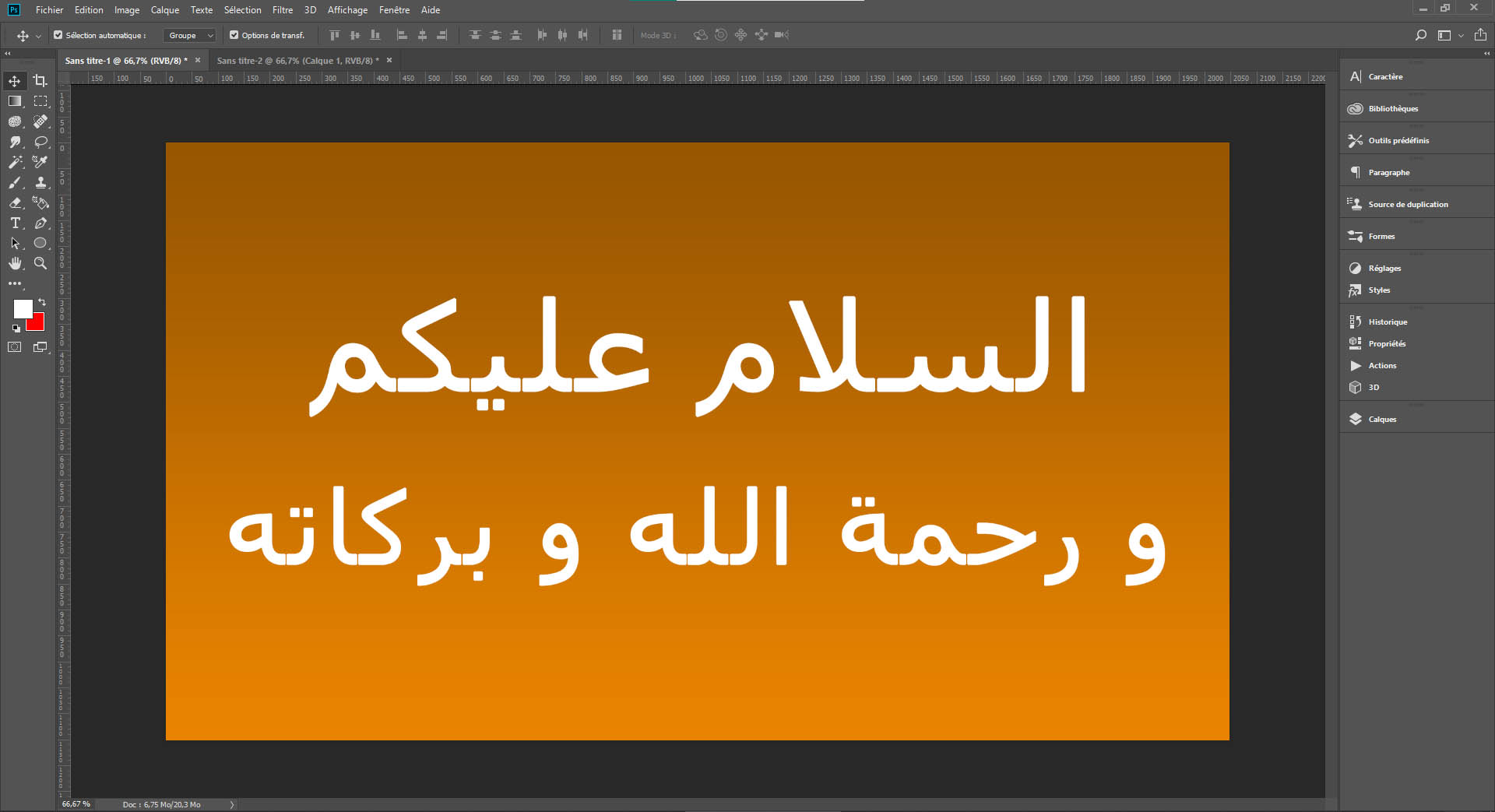
✅ With our tool: text displays perfectly
💡 Other Use Cases
Our Arabic text reverser also works with:
- PowerPoint/Keynote presentations (older versions without full RTL support)
- CAD/CAM software (AutoCAD, SketchUp) for Arabic annotations and labels
- Subtitle editors (Aegisub, Subtitle Edit) for creating Arabic subtitles
- Thumbnail creation apps for YouTube and social media graphics
- GIF and meme generators with Arabic text
- Animation software (Blender, Cinema 4D) for 3D Arabic text
- Game development engines (Unity, Unreal Engine) when prototyping UI with Arabic text
- Discord bots and chatbots that need to display Arabic messages
The versatility of our tool makes it invaluable across countless digital workflows. From professional designers creating marketing materials to hobbyists making memes, anyone working with Arabic text in non-RTL-aware software benefits from this simple yet powerful solution.
❓ Frequently Asked Questions (FAQ)
🔗 Related Tools
Discover our other free tools for the Arabic-speaking community:
- Virtual Arabic Keyboard: Type in Arabic directly from your browser, no installation required
- Special Adobe Photoshop Tool: Detailed guide for Photoshop, Illustrator, InDesign and After Effects
- BAC Average Calculator: Calculate your Moroccan baccalaureate average
- Precise Age Calculator: Calculate your exact age in years, months and days
💬 Share This Tool
If this tool helped you, share it with your content creator friends, streamers, gamers, and designers who need to write in Arabic in their software. The more people we help, the more we contribute to making the web and software accessible to the Arabic-speaking community!
💡 Pro Tip: If you use this tool frequently, bookmark this page (Ctrl+D) for quick access. You can also keep it open in a tab during your editing, streaming, or gaming sessions!